How to Read a Cutting Layout Before You Cut
Read a Grainline layout quickly, understand what it is telling you, and take it into the shop with confidence.
By the time Grainline generates a layout, the hard part is already done.
It has already worked through board usage, grain direction rules, cut flow, and leftover shape. What you are doing now is not re-solving the problem. You are just reading the result in a practical way before you cut.
Start with the board count
The fastest first read is the summary. The most important thing is: how many boards each material needs.
This gives you the big picture immediately. Before you care about any single cut, you already know what the plan is asking you to buy or pull from stock. If the summary feels off, do not assume another run will fix it. Check whether some inputs are unnecessarily restrictive. For example, some parts may not need a strict grain direction, and kerf can make a real difference. In some projects, changing kerf from 5 mm to 3 mm is enough to save an entire sheet.
Then look at the layout as a whole
Next, look at the sheet layout itself.
You are not trying to audit every decision. You are just getting a quick sense of whether the arrangement looks natural for your parts and boards.
In most cases, that is enough to tell you whether the result basically matches what you expected.
Use the part details when you want a closer read
Each part carries more information than its position alone.
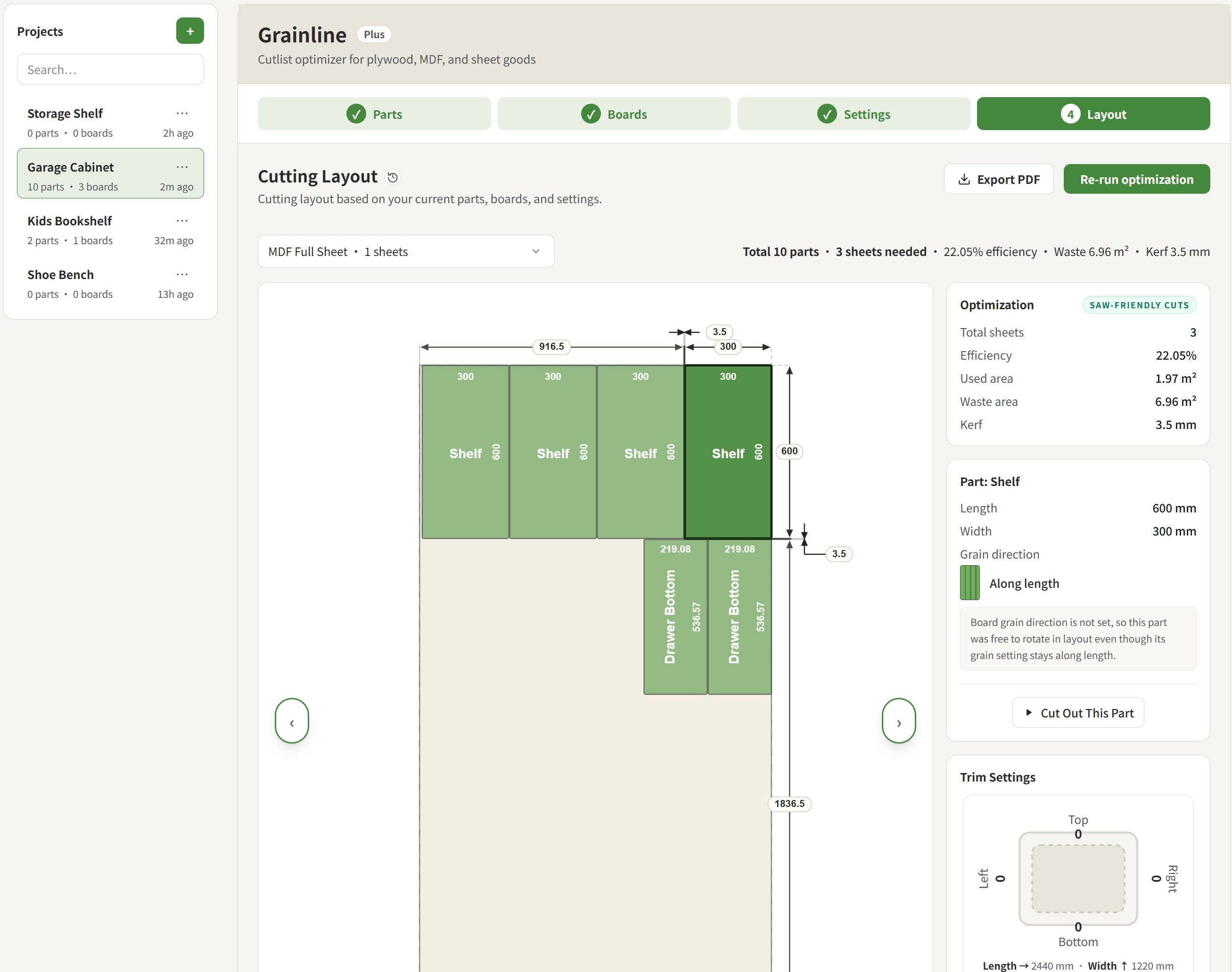
The layout details help you read:
- dimensions
- labels
- board assignment
- grain direction
That is usually all you need when a visible panel, a matching pair, or a direction-sensitive part deserves a second look.
Simulation helps when the cut flow is less obvious
Some layouts are obvious at a glance. Others are easier to trust once you see the sequence.
Simulate cut flow lets you follow how a sheet is broken down step by step, especially when the release order is not immediately intuitive.
You can also focus on a single part and use Cut out this part to see how that piece is released from the sheet.
Grain direction and leftovers matter in the result
A good layout is not only about fitting everything onto fewer boards.
It should also leave you with a result that still makes sense in the shop: visible parts oriented the way you wanted, and leftovers that remain worth keeping instead of turning into awkward waste.
That is part of why the layout is useful as a real cutting plan, not just as a packing diagram.
Export and history make the plan easier to use
Once the layout looks right, PDF export gives you a version you can print, keep nearby, or carry into the shop.
History lets you return to the same layout later, compare versions, or reopen a previous plan without rebuilding the whole project.